
Bad graphics are the most expensive mistake in trade show exhibiting — not because they cost more to produce, but because they waste every other dollar in your booth budget. You can spend $15,000 on a custom exhibit structure and $3,000 on a well-located space, then hand an attendee at 20 feet away a graphic that communicates nothing useful, and the entire investment underperforms.
Trade show booth graphics do more work than any other element in the exhibit — they communicate your brand, product category, and value proposition to every attendee who walks the aisle, whether they stop or not. Getting them right is a combination of design strategy, file preparation, and understanding how print format and viewing distance interact on the show floor. This guide covers all three. For context on how graphics integrate into a complete exhibit build, see how our trade show booth builder team designs graphics alongside structure from the first rendering — not as a separate step at the end.
Why Do Trade Show Booth Graphics Determine Whether Attendees Stop?
The show floor is a visual environment where every exhibitor is competing for the same scarce resource: the attention of a moving attendee. That attendee is making a stop-or-continue decision for every booth they pass, at walking speed, from 15 to 30 feet away. Your graphics are the only element in your booth that reaches that decision.
Your staff cannot engage someone who has already walked past. Your product demo cannot run for someone who never entered the booth. Your counter, your monitor, your signage — all of it only works once someone decides the booth is worth entering. The graphic is what drives that decision, which means a weak graphic suppresses the performance of every other element in the exhibit.
The stakes are higher at design-competitive shows. At CES, NAB Show, HIMSS, and RSA Conference, attendees are evaluating brand quality as they walk the floor — and they have a well-calibrated reference point from hundreds of exhibitors they have seen at previous editions of the same show. A graphic that looks strong at a regional event can look under-invested next to the displays that surround it in the Central Hall of the Las Vegas Convention Center.
What Are the Different Graphic Surfaces in a Trade Show Booth?
A trade show exhibit contains multiple graphic surfaces, each with a different viewing distance, size, content role, and production specification. Understanding each surface is the prerequisite to briefing your graphic designer correctly.
Back Wall Display
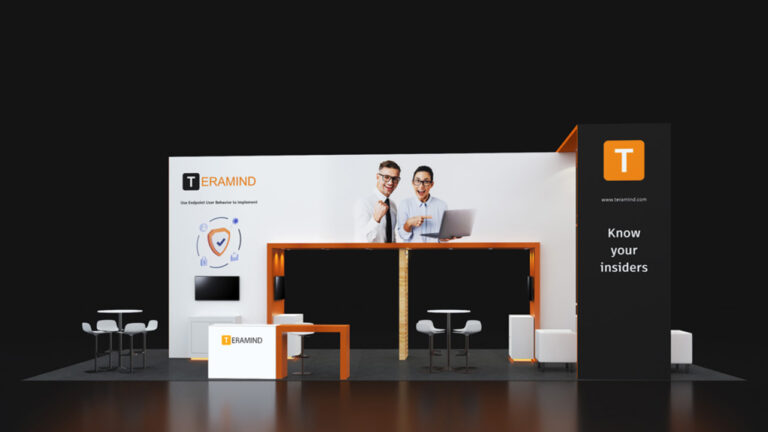
The back wall is the largest and most visible graphic surface in any inline booth. It is read from the aisle at 15 to 30 feet and communicates the exhibitor’s brand and primary message before any other element is noticed. Back wall graphics in modern exhibits use dye-sublimation fabric on an aluminum SEG frame, or a backlit LED version of the same format. For a full breakdown of back wall formats and what each one costs, the trade show booth backdrop guide covers every option from portable retractable banners to custom backlit walls.
Counter Graphics
Counter graphics appear on the front face or top surface of the booth counter. They are read at close range — 2 to 5 feet — by attendees who have already entered or approached the booth. This proximity changes the content rules: counter graphics can carry more detail than back wall graphics because the viewing distance is shorter. Company name, product category, a brief supporting message, and contact information are all appropriate at counter-graphic scale.
Side Wall and Wing Panels
In a 10×20 or larger inline configuration, side walls and wing panels extend the graphic surface beyond the back wall. They are visible to attendees approaching from an angle — before the back wall comes into direct view — and serve as directional cues that draw visitors toward the booth entry. Side wall graphics are typically secondary messaging: a product image, a tagline, or a supporting visual that reinforces the back wall’s primary message without competing with it.
Hanging Signs and Overhead Graphics
Island configurations at 20×20 and above typically include hanging signs suspended above the booth — round, square, or custom-shaped fabric structures visible from across the hall. These are the highest-visibility graphic surface in a large booth because they clear the heads of attendees and neighboring displays. Content on a hanging sign is limited to a logo and possibly a four-to-five-word tagline — nothing more is legible at the 30-to-50-foot viewing distance from which hanging signs are read.
Monitor and Digital Screens
Monitors mounted in the booth display motion graphics, product demos, testimonials, or data visualizations. They are not static print graphics — they require a separate content brief and production track. Static print graphics and digital screen content must be designed to work together visually, not independently. The most common mistake is designing a static graphic program and treating screen content as an afterthought, which produces a booth where the two graphic systems look like they came from different companies.
| Graphic Surface | Viewing Distance | Content Role | Primary Format |
|---|---|---|---|
| Back wall display | 15–30 feet (aisle) | Brand identity + primary message | SEG fabric or backlit LED |
| Counter front face | 2–5 feet (approach) | Company name + supporting message | SEG fabric or rigid print panel |
| Side wall / wing panels | 10–20 feet (angled approach) | Secondary message + directional | SEG fabric panels |
| Hanging sign | 30–50 feet (across hall) | Logo only or logo + 4-5 word tagline | SEG fabric — round or custom shape |
| Monitor / digital screen | 3–8 feet (inside booth) | Demo, motion content, data | HD video — separate content brief |
| Counter top surface | 1–2 feet (conversation distance) | Product spec, QR code, contact info | Rigid print or fabric mat |
How Do You Size Your Graphics for Different Booth Footprints?
Graphic dimensions must be specified from your booth footprint and the show’s height regulations — not from a generic template. Undersized graphics leave visible gaps in the display structure. Oversized graphics violate height limits or encroach on neighboring booth sightlines.
10×10 Booth Graphics
A standard 10×10 trade show booth back wall graphic is 10 feet wide by 8 feet tall — covering the full inline width and the standard 8-foot height limit. Some shows permit a back wall height of 8.5 or 9 feet for specific frame profiles; always confirm the height limit in the exhibitor kit before ordering frames. The counter front graphic for a 10×10 is typically 36 to 48 inches wide by 36 to 40 inches tall. No hanging sign or side wall graphics apply at a 10×10 inline footprint.
10×20 Booth Graphics
A 10×20 trade show booth gives you 20 linear feet of back wall. The most common graphic approaches are a single 20×8 SEG display for a fully unified graphic, or two 10×8 panels that divide the wall into a brand section and a product or messaging section. Side wall end-cap graphics become relevant at 10×20 — each 10-foot-deep side wall end provides approximately 10×8 feet of graphic surface visible to attendees approaching from an angle.
20×20 and Island Configurations
Island configurations require graphics on all four sides of the exhibit perimeter, plus any hanging signs or tower elements above. Each face functions as a back wall in terms of viewing distance and content rules — logo visible, one primary message per face, no paragraph text. A common mistake in island graphic briefing is treating all four faces identically. Different faces may serve different purposes: a primary brand face toward the main aisle, a product demo face toward a specific traffic corridor, and a secondary messaging face on the remaining sides.
What Makes Trade Show Booth Graphics Design Actually Work?
Effective exhibit graphics are not a design style — they are a set of measurable rules applied to a specific viewing context. These rules apply regardless of industry, brand personality, or budget level.
The Three-Element Back Wall Rule
Your back wall graphic should contain exactly three elements: your logo at the top third of the display, one hero image that communicates your product category or application without requiring text to interpret, and a headline of five to seven words that answers the question ‘what do you do?’ in language your target buyer uses. Nothing else. Every additional element — a second headline, supporting copy, a feature list, a product name, your website URL — reduces the clarity of the primary message at aisle-reading distance.
Design for 20 Feet, Not for Your Screen
The most consistent briefing error is designing a graphic at screen size and evaluating it at monitor resolution, then sending it to print. At 20 feet, text smaller than 3 inches in height is not legible. Logos placed at eye level or lower are obscured by passing attendees. Busy background patterns that look subtle on a monitor become visual noise at large format. Test every back wall design by reducing it to a 3-inch thumbnall — if the logo, image, and headline are clear at thumbnail size, the design works at aisle distance. For Pure Exhibits’ process for reviewing graphics at production scale before fabrication is approved, see our exhibition booth design service overview.
Color Contrast Drives Visibility
High-contrast color combinations — dark background with light text, or light background with dark text — are readable from the aisle. Low-contrast combinations — gray text on a white background, navy text on a dark blue background — require attendees to slow down and read carefully, which most will not do at walking speed. If your brand color palette produces low-contrast combinations, add a contrast element: a colored text block, a highlight bar, or a reversed-out headline section. The contrast rule applies most critically to the headline — the single most important text element in the display.
Brand Photography Versus Stock Imagery
Custom brand photography — product shots, application images, or people using your product in context — consistently outperforms stock imagery at trade shows. Attendees recognize stock photography from other marketing contexts, which reduces its credibility as a brand signal. If your budget allows one photography investment for the show season, allocate it to the hero image on your back wall graphic. A single strong product-in-context photograph on a clean background, sized to fill the image zone of your back wall, will outperform any stock image at the same location.
What Are the Technical Specs for Trade Show Booth Graphics?
Graphic files submitted at the wrong specifications are either rejected by the print vendor or produce a blurry, color-shifted, or incorrectly scaled output. These are the technical requirements that apply to every trade show graphic production run.
Resolution Requirements
Large-format fabric and vinyl prints require artwork submitted at the correct resolution for the print size. The standard minimum for trade show fabric graphics is 100 dpi at final print dimensions. For close-viewing surfaces — counter graphics, side panels seen at under 10 feet — 150 dpi at final size is recommended. Screen resolution (72 or 96 dpi) is never acceptable for large-format print production. A 10-foot-wide back wall graphic requires a file that is at minimum 12,000 pixels wide at 100 dpi — or a proportionally equivalent file set at a reduced scale with the correct dpi value.
Color Mode: CMYK Not RGB
Graphic files for print production must be submitted in CMYK color mode, not RGB. RGB is the color model used by monitors and digital screens — it produces colors that cannot be accurately reproduced in print. CMYK is the four-color print model. Submitting an RGB file to a print vendor results in color shift at output — typically a reduction in saturation and a shift in hue — that is most visible in brand colors and photography. Convert all files to CMYK before submitting, and review the CMYK color values of your brand colors against the Pantone Coated reference if color accuracy is critical.
Accepted File Formats
The standard accepted formats for large-format trade show graphic production are AI (Adobe Illustrator), PDF (print-ready, with bleeds and fonts outlined), and PSD (Adobe Photoshop, flattened, at correct resolution). EPS is accepted by most vendors for vector-based artwork. JPEG is accepted for photography-only files at the correct resolution. PowerPoint, Word, and PNG files are not accepted for production by professional print vendors — graphics built in these formats must be rebuilt in a professional layout application before going to print.
Bleed and Safe Zone Requirements
Large-format prints require a bleed — an extension of the background color or image beyond the trim edge — of at least 0.5 inches on all sides. This accounts for minor variation in cutting and framing. The safe zone — the area where all critical content (logo, headline, key imagery) must be contained — is typically 1 inch inside the trim edge on all sides. Text or logos placed outside the safe zone risk being partially obscured by the frame channel in an SEG system or trimmed in a hard-panel application.
| Spec | Requirement | Why It Matters |
|---|---|---|
| Minimum resolution | 100 dpi at final print size (150 dpi for close-viewing surfaces) | Prevents blurry output at large format |
| Color mode | CMYK (not RGB) | Prevents color shift between screen and print |
| Accepted file formats | AI, PDF (print-ready), PSD (flattened), EPS, JPEG (photography only) | Ensures production-ready files |
| Bleed | 0.5 inch minimum on all sides | Prevents white edges at frame or trim |
| Safe zone | 1 inch inside trim edge on all sides | Prevents content being obscured by frame channel |
| Font handling | All fonts outlined or embedded in PDF | Prevents missing font substitution at production |
| Image embedding | All linked images embedded in file | Prevents missing image errors at production |
What Do Graphic Standards Look Like at Major Las Vegas Trade Shows?
The graphic standard at Las Vegas events is higher than at most U.S. trade show markets — because attendees at Las Vegas shows see more exhibits per year than attendees at any other single market, which gives them a sharper calibration for quality differences. Our las vegas trade show booth rentals include a full graphic design and production review before every show — so your display meets the specific visual standard of the event, not a generic baseline.
CES — Venetian Expo and LVCC
CES is the highest-stakes graphic environment in the U.S. trade show calendar. Central Hall exhibitors include global consumer electronics brands with in-house creative teams and multi-show graphic programs refined over years. The baseline expectation at CES is a high-resolution back wall with a strong brand photograph, a clear and specific headline, and no visible budget signals — which means no retractable banners, no vinyl graphics, and no pop-up displays. Backlit LED fabric is the preferred format for any exhibitor who wants to be competitive in the Central or West Halls.
NAB Show — LVCC
NAB Show exhibitors are in the business of visual content production — broadcast technology, camera systems, post-production tools, streaming infrastructure. An exhibitor whose booth graphic looks like it was designed in PowerPoint is communicating something unintentional about their product’s quality. At NAB, the graphic brief should be held to a production standard comparable to the work your product produces. Photography must be professional. Typography must be intentional. Color must be accurate and consistent with your brand standards.
SEMA Show — LVCC
SEMA is a visually intense environment where automotive brands compete with large-format printing, custom fabrication, vehicle displays, and brand activations designed by automotive marketing specialists. At SEMA, a 20×20 island exhibit with a standard fabric back wall and no dimensional elements reads as a background. The graphic brief for a SEMA exhibit needs to account for the competitive visual density of the show floor — bold photography, high-contrast color, large-scale type, and ideally some dimensional graphic element that breaks the flat wall plane.
For a 20×20 trade show booth rental at SEMA or similar high-intensity shows, Pure Exhibits builds the graphic brief around four-sided visibility and dimensional features — not just back-wall coverage — so the exhibit reads as a destination rather than a backdrop.
How Much Do Trade Show Booth Graphics Cost?
Graphic costs have two components: design fees and print production. Design fees vary by the complexity of the brief and the number of revision rounds. Print production is priced by surface area, material, and format. For a complete view of how graphic costs fit into the full exhibit budget — alongside structure, freight, and show services — the trade show booth rental cost guide breaks down every cost component by booth size.
| Graphic Surface | Design Cost (Est.) | Print Production Cost | Reprint Cost (Messaging Change) |
|---|---|---|---|
| Back wall — 10×8 SEG fabric | $500–$2,000 | $150–$400 | $150–$400 (frame reused) |
| Back wall — 10×8 backlit fabric | $500–$2,000 | $150–$400 | $150–$400 (frame reused) |
| Back wall — 20×8 SEG fabric | $800–$2,500 | $250–$600 | $250–$600 (frame reused) |
| Counter front graphic | $200–$600 | $80–$200 | $80–$200 |
| Side wall panel — 10×8 | $300–$800 | $150–$350 | $150–$350 |
| Hanging sign — round or square | $400–$1,200 | $200–$500 | $200–$500 |
| Full 10×10 graphic package (all surfaces) | $1,200–$4,000 | $400–$1,000 | $400–$1,000 |
Reprinting fabric graphics when messaging changes costs only the print production fee — the aluminum frame is reused. For exhibitors on a multi-show program, the amortized per-show graphic cost decreases significantly from show two onward.
What Graphic Mistakes Cost Exhibitors the Most at Trade Shows?
- Submitting low-resolution files. Screen-resolution files (72 dpi) submitted for large-format production print blurry at scale. The result is a professionally fabricated display structure carrying a graphic that looks like it was printed at an office supply store. Always confirm resolution requirements with your print vendor before starting file preparation.
- Putting the logo below eye level. A logo placed at eye level or lower on the back wall is blocked by your own staff standing in front of the display and by passing attendees on the show floor. Place the logo at the top third of the back wall — above head height — where it is visible from the aisle at all times, regardless of what is happening in front of the display.
- Using your company tagline as the headline. A tagline is a brand positioning statement written to be memorable over time. A trade show headline is a direct answer to the question ‘what do you do?’ written to be understood in two seconds. These are different jobs. If your tagline answers the question clearly, use it. If your tagline is abstract, poetic, or requires brand context to interpret, write a new headline for the show.
- Designing for a different booth size. A graphic designed for a 10×10 that gets scaled to a 10×20 is stretched horizontally — everything in the image becomes wider than it should be. A graphic designed for a 10×20 that gets scaled to a 10×10 crops content. Every graphic must be designed at the exact dimensions of the booth it will be installed in.
- Ignoring the show’s height limit. A back wall graphic that extends above the show’s inline height limit — typically 8 feet — triggers a modification order from show management during move-in. In most cases, the graphic must be trimmed or the frame must be rebuilt. Always confirm the height limit in the official exhibitor kit before specifying frame and graphic dimensions.
One factor that works alongside graphics in determining your booth’s overall visual quality is whether the underlying material choice is sustainable and designed for reuse. A graphic program built for a single show generates more waste per impression than one built to run across multiple years. The sustainable trade show booth guide covers how to design your graphic and material program for a multi-show lifecycle.
Conclusion
Trade show booth graphics are a technical and strategic discipline, not a creative exercise. The decisions that determine whether your graphics work on the show floor — three elements on the back wall, design for 20-foot viewing distance, correct resolution and color mode, dimensions matched exactly to your booth footprint — are measurable requirements, not style preferences.
Every dollar spent on booth structure, show space, staffing, and logistics performs better when the graphics communicate clearly from the aisle. Getting the graphic brief right before anything goes to print is the single highest-leverage investment in your exhibit program.
Let’s Build Something Extraordinary
Share your event details and we’ll craft a custom booth solution designed to captivate your audience and maximize your ROI.
Frequently Asked Questions
What file format should I submit for trade show booth graphics?
The standard accepted formats for large-format trade show print production are AI (Adobe Illustrator), print-ready PDF with bleeds and fonts outlined, and PSD (Adobe Photoshop, flattened, at correct resolution). EPS is accepted for vector-based artwork. High-resolution JPEG is accepted for photography-only files. PowerPoint, Word, PNG, and low-resolution JPEG files are not accepted for professional large-format production. If your designer works in a program that does not output these formats, the files must be rebuilt in a professional layout application before going to production.
What resolution do trade show graphics need to be?
Submit artwork at a minimum of 100 dpi at the actual final print size. For close-viewing surfaces — counter graphics, side panels viewed at under 10 feet — 150 dpi at final size is recommended. For a 10-foot-wide back wall, your file must be at least 12,000 pixels wide at 100 dpi, or a proportionally equivalent file set at a reduced scale with a higher dpi value. Never submit screen-resolution files (72 or 96 dpi) for large-format trade show print production.
What is the standard size for a 10×10 trade show booth back wall graphic?
A 10×10 inline booth back wall graphic is typically 10 feet wide by 8 feet tall — matching the standard inline height limit at most U.S. shows. In pixels at 100 dpi, that is approximately 12,000 x 9,600 pixels. Always confirm the specific height limit for your show in the official exhibitor kit before finalizing frame and graphic dimensions, as some venues allow 8.5 or 9 feet for specific frame profiles.
Should trade show graphics be in CMYK or RGB?
CMYK. All graphics intended for print production must be converted to CMYK color mode before submission. RGB is the color model used by monitors and cannot be accurately reproduced in print. Submitting an RGB file produces color shift at output — reduced saturation and hue drift — most visible in brand colors and photography. Convert your files to CMYK and check your brand colors against their CMYK or Pantone Coated equivalents before finalizing the design.
How much text should be on a trade show booth back wall?
The back wall should contain one headline of five to seven words — nothing more in text. No paragraph copy, no feature lists, no product names, no URLs, no bullet points. Everything on the back wall is read from 15 to 30 feet by someone moving at walking speed. At that distance and speed, only a short, high-contrast headline is legible. Every additional line of text reduces the clarity of the primary message without adding information that the aisle-level viewer can absorb.
Can I reuse my trade show booth graphics at multiple shows?
Yes. Dye-sublimation fabric graphics — the standard format for modern SEG trade show displays — maintain color fidelity across multiple installations and packings. The aluminum frame is reused indefinitely. When your messaging changes, you reprint the fabric and snap it into the same frame. A well-designed back wall graphic built around brand positioning rather than campaign-specific content can run 12 to 24 months across multiple shows without requiring a reprint.
What is bleed in trade show graphics?
Bleed is an extension of the background color or image beyond the trim edge of the graphic, typically 0.5 inch on all sides. It accounts for minor cutting or framing variation during production. Without bleed, a slight misalignment in trimming produces a thin white edge at the border of the graphic — visible against the display frame and difficult to fix after production. All graphic files for large-format print must include the correct bleed before being submitted to a print vendor.
What is the difference between fabric and vinyl trade show graphics?
Dye-sublimation fabric graphics are the current industry standard: lighter, more compactly packable, and reprinted on the same frame for each update. Vinyl banner graphics are the older format — they use solvent or UV printing on a PVC substrate, are heavier, do not pack as flat, and are not easily reused. Fabric produces comparable or better visual quality at large format and generates less waste at end of life. Most professional exhibit companies have moved to fabric as the default print medium for trade show displays.
How do I brief a designer for trade show booth graphics?
A complete graphic design brief for a trade show booth should specify: the exact dimensions of each graphic surface (not ‘standard size’ — the actual measurement confirmed from the exhibitor kit), the viewing distance for each surface, the content hierarchy for the back wall (logo placement, headline, hero image zone), the brand color values in CMYK, the approved photography or image assets, and the file format and resolution requirements for the print vendor. The brief should also specify what is not on the graphic — this prevents designers from adding content that works at screen size but fails at large format.
How far in advance should I order trade show booth graphics?
For standard fabric print production, plan for a two-week turnaround from approved file to shipped graphic. Add one to two weeks for design and revision if you are starting from a new brief. For a show with an advance warehouse deadline — typically two to three weeks before move-in — you need approved graphics at least four to five weeks before the show opens. Rush production is available from most vendors at a premium; production timelines under five business days carry a 25 to 50 percent surcharge at most shops.
What is the safe zone in a trade show graphic?
The safe zone is the area inside the trim edge where all critical content — logo, headline, key imagery — must be positioned. The standard safe zone is 1 inch inside the trim edge on all sides. Content placed outside the safe zone risks being partially obscured by the SEG frame channel, trimmed during production, or hidden behind structural elements during installation. Logos, headlines, and faces in photography should always be well inside the safe zone — never in the bleed or within half an inch of the trim edge.
Should I use stock photography or custom photography for my trade show graphics?
Custom photography consistently outperforms stock in trade show graphic applications. Attendees recognize stock images from other marketing contexts — product category shots, generic office environments, and people-in-business-setting photographs appear across dozens of brands simultaneously. Custom photography of your actual product in use, your actual team, or your actual application environment communicates authenticity that stock images cannot replicate. If your budget allows one photography investment for the show season, apply it to the hero image on your back wall. A single strong custom photograph will deliver more brand value per dollar than any other graphic production investment.