
The exhibitor hands over a brochure. The visitor tucks it into a tote bag that holds forty other brochures. By the time the visitor is back at the hotel that night, they cannot remember which company gave them which sheet — and most of the stack goes into the trash. Paper handouts are a $2,000 print run that produces a 3 percent recall rate on a good day. The problem is not that visitors are uninterested — it is that the physical-to-digital handoff at a trade show booth is broken. QR codes fix that handoff. Scanned in two seconds, the code sends a visitor directly to a lead form, a spec sheet, a product video, or a booking calendar without any paper required, any URL to remember, or any friction between the booth conversation and the follow-up action.
The execution, however, is where most QR code programs fall apart. A code linked to the company homepage, printed at half an inch in the corner of a back wall panel, with no text explaining what scanning it will do — that is not a digital engagement tool, it is a decorative element that nobody scans. This guide covers how to use trade show booth QR codes correctly: what to link to, where to place them, how to size them for the specific distance they will be scanned from, and how to avoid the implementation mistakes that make QR codes useless. For the full cost picture of a trade show program, the trade show booth rental cost guide covers every line item including the exhibit, graphics, GSC services, and staffing.
Need a Booth?
Pure Exhibits Designs Las Vegas Trade Show Booths That Integrate QR Code Placement, Graphics, and Lead Capture From the Start.
Why Are QR Codes Used at Trade Show Booths?
QR codes solve three distinct problems at a trade show booth. The first is the memory problem: a visitor who has a meaningful conversation at your booth at 10 a.m. has visited 20 other booths by 3 p.m. A scanned QR code that delivers an instant download or confirmation email anchors your booth in the visitor’s inbox or downloads folder — it survives the show in a way that a business card tucked into a pocket does not.
The second problem QR codes solve is the handout weight problem. Visitors at multi-day shows quickly learn not to take paper — it accumulates in their bag, it adds weight, and most of it does not make it home. A QR code that delivers the same content to their phone eliminates the physical burden entirely. The content arrives in a format the visitor can actually act on after the show closes.
The third problem is the lead quality gap. Standard lead retrieval scanners capture contact information at the point of badge scan — but they do not capture what the visitor was interested in, what content they engaged with, or what action they were ready to take. A QR code that routes to a targeted lead form or appointment booking calendar captures the visitor’s intent at the moment of highest engagement, when they have just had a conversation about a specific product and are ready to take a specific next step. That intent data is significantly more actionable than a scanned badge with a blank notes field.
What Are the Best Uses for QR Codes at a Trade Show Booth?
Not every QR code application produces the same return. Lead capture forms and appointment booking links generate direct, measurable pipeline value. Content downloads build awareness and extend the conversation post-show. Social follows and giveaway entries drive engagement volume but require a qualification step before they contribute to pipeline. Use the right QR code application for the stage of the buyer conversation you are trying to support.
| Use Case | What the Visitor Does | Best For | Pipeline Value |
|---|---|---|---|
| Lead capture form | Scans, submits name + email + company + phone — receives immediate confirmation | Any show where self-qualification is a goal; visitors who want to control what they share | High — warm, intent-confirmed lead delivered to CRM instantly |
| Digital brochure / product spec download | Scans, receives PDF directly to phone or email | Technical buyers who evaluate specs before engaging sales; replaces printed handouts | Medium — builds consideration; triggers follow-up sequence |
| Product demo video | Scans, watches 60–90 second video on their own phone | Products where live demo requires setup time or specialized equipment | Medium — strong engagement signal; visitor who watches full video is warm |
| Appointment booking (Calendly or equivalent) | Scans, selects post-show meeting slot directly from calendar | Qualified visitors who have expressed purchase intent during booth conversation | High — direct pipeline action; meeting booked before visitor leaves your booth |
| vCard / contact card download | Scans, saves exhibitor team member’s contact info to phone contacts | General networking; visitors who prefer reaching out on their own timeline | Low-Medium — warm touch; visitor controls the follow-up pace |
| Giveaway or contest entry | Scans, submits entry form, receives confirmation | High-traffic shows where booth engagement volume is a priority metric | Low for direct pipeline; generates volume that requires a qualification step |
| Social media follow | Scans, follows Instagram or LinkedIn profile directly | Brand-building programs; consumer-adjacent B2B categories with long nurture cycles | Low for immediate pipeline; useful for top-of-funnel awareness segments |
The most common mistake in QR code strategy is deploying one code for multiple purposes — one code that sometimes links to the website, sometimes to the brochure, and sometimes to a lead form depending on who is staffing the booth that day. Each QR code should have a single, specific destination tied to a single intended visitor action. If you want to support three different actions, deploy three separate codes — one per handout card tier — rather than one multipurpose code that accomplishes none of them well.
Where Should You Place QR Codes on a Trade Show Booth?
Placement determines scan rate more than design quality. A well-executed QR code in the wrong location will not be scanned regardless of how good the destination experience is. For professional exhibition booth design, QR code placement is a planned design decision — not something added to the graphic after the layout is finalized — because the scanning distance, the viewer height, and the surrounding visual context all affect whether a code gets noticed and scanned.
Eye-Level on the Back Wall or Side Panel
The most-scanned position for a back wall QR code is eye level — between 54 and 66 inches from the floor — positioned within a dedicated graphic element that communicates the scan action clearly. A code at eye level on a back wall panel is scannable from inside the booth during a conversation, from the aisle by a passing visitor who sees the call-to-action text, and by staff pointing to it as a natural part of their handoff script. It should be paired with 4 to 6 words of context: ‘Download the Spec Sheet’ or ‘Book Your Post-Show Demo’ placed above the code, with ‘Scan Here’ below.
Counter or Tabletop Display
A counter-height QR code on a tabletop display card or counter insert positions the code perfectly for the end of a booth conversation — when the visitor is standing at the counter and the staff member is completing the interaction. This is the highest-conversion placement because it catches the visitor at peak intent, right after a qualified conversation, in a format that mirrors the way they scan codes in everyday commercial contexts (restaurant menus, retail checkout). A 2.5 by 2.5 inch code on a counter card with a clear CTA is a standard component in any professional booth that uses QR codes for lead capture.
Pocket Card and Badge-Format Handouts
A pocket-sized card — credit card format or slightly larger — is the portable version of the booth’s primary QR code. The visitor takes it with them, it survives the show better than a full-size brochure, and it reaches the visitor after show hours when they have time to actually engage with the destination. The card should carry one QR code, one call-to-action, and your brand mark. Nothing else. The trade show booth graphics guide covers print specifications for supplemental collateral including pocket cards, counter cards, and tabletop displays that integrate QR codes into the booth’s visual system.
Placement Positions to Avoid
Avoid placing QR codes below knee height — visitors will not crouch to scan a code on a floor-level panel. Avoid placement above 72 inches on a back wall — too high for comfortable phone positioning. Avoid embedding a QR code as a small element within a dense graphic; if the code is smaller than the surrounding text and competes with the surrounding design, it will be ignored. One dedicated graphic panel or section for the primary QR code — with visual hierarchy that makes it the focal point of that panel — outperforms a code scattered across multiple graphics at random sizes.
How Do You Set Up a QR Code for a Trade Show Booth?
The setup process for trade show booth QR codes has five steps: choose a dynamic code platform, create the code and link it to the intended destination, configure the code’s visual design and error correction, size it correctly for each application, test it thoroughly before approving graphics for production, and monitor performance during the show. Skipping any of these steps is how exhibitors end up with codes that look professional but do not scan reliably.
Dynamic vs. Static QR Codes: Always Use Dynamic
A static QR code encodes the destination URL directly into the code pattern. If the destination URL changes after the code is printed — because the landing page moved, the link broke, or you want to update the offer — the code must be reprinted. A dynamic QR code links to a redirect URL that you control; the actual destination can be changed at any time without touching the printed code. For trade show applications where the landing page may be updated between shows, where you want to run A/B tests on the destination, or where you want to track scan analytics, dynamic codes are non-optional. Use a platform that provides dynamic QR codes with analytics built in — Bitly, QR Code Generator Pro, or Beaconstac are the most commonly used options in trade show programs.
QR Code Print Size Specifications by Application
The minimum scan distance determines the minimum print size. A code scanned at arms length (counter card, handout) can be as small as 1 inch. A code scanned from aisle distance (back wall panel at 4 to 6 feet) needs to be at least 3 to 4 inches to scan reliably with a standard phone camera. Use the table below as a production reference when preparing graphics files.
| Application | Min. Print Size | Recommended Size | Expected Scan Distance |
|---|---|---|---|
| Pocket card / handout card | 0.75″ × 0.75″ | 1.25″ × 1.25″ | Arms-length (12–24 inches) |
| Counter display / tabletop insert | 1.5″ × 1.5″ | 2.5″ × 2.5″ | Across a table (24–36 inches) |
| Back wall panel (integrated within graphic) | 3″ × 3″ | 4″ × 4″ | Inside-booth conversation distance (3–5 feet) |
| Back wall panel (dedicated scanning zone) | 4″ × 4″ | 5″ × 6″ | Aisle passing distance (5–8 feet) |
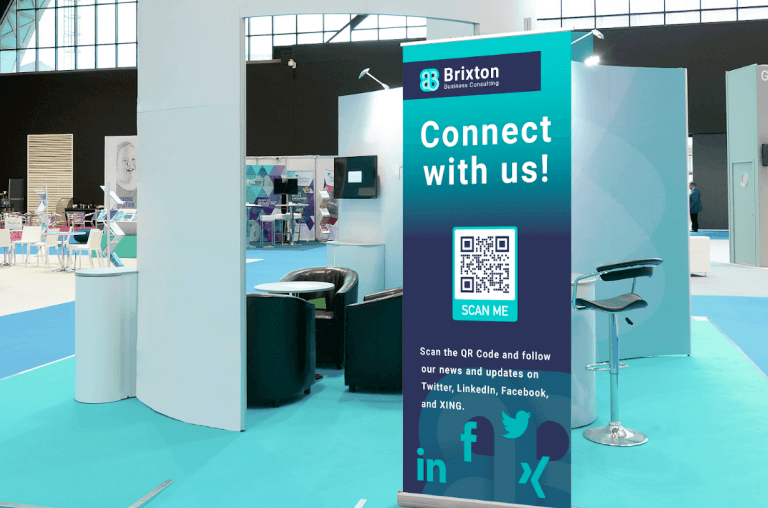
| Freestanding banner or floor sign | 5″ × 5″ | 7″ × 7″ | Open floor approach distance (6–10 feet) |
Color and Contrast Requirements
QR codes scan most reliably when the code pattern is dark on a light background — dark navy, black, or charcoal on white or light gray. Reversed-out codes (light on dark background) fail significantly more often than standard-contrast codes, especially in poor lighting conditions common on busy show floors. If your brand palette requires the code to appear on a dark panel, place the code inside a white or light-colored inset block rather than reversing the code out. Test the final version under low-light conditions — not just in daylight — before approving graphics for production. For any questions on how QR codes integrate into your exhibit’s graphic file specifications, review the trade show booth graphics guide for print-ready file requirements and color profile standards.
Test on Both iOS and Android Before Approving Graphics
QR code scanning performance varies by phone OS version, camera app, and ambient light condition. Before approving any graphic file for production, scan the proof version using the native camera app on both a current iOS device and a current Android device — not a third-party QR scanner app. If the code scans cleanly on both platforms at the expected viewing distance and under typical indoor lighting, approve the file. If it fails on either platform, increase the code size, improve the contrast, or increase the error correction level in your QR code generator settings. Never approve a graphic containing a QR code without completing this test — reprinting a back wall panel because the code does not scan costs more than the original print run. Bringing a printed sample for testing is also recommended as part of what to pack; the what to bring to a trade show checklist covers show-day tech items including backup materials for digital tools.
What Should a Trade Show Booth QR Code Link To?
The destination is where most QR code programs fail — not the code itself. The code scans fine; the visitor lands on a page that requires 8 clicks to find the spec sheet, or asks them to log in to download a brochure, or sends them to the company homepage with no clear next step. A QR code that delivers a poor destination experience trains visitors not to scan QR codes at your booth. The destination must be built before the graphic is finalized, not added as an afterthought after the show.
The Best Destination: A Dedicated Show Landing Page
A dedicated landing page built specifically for the show is the highest-converting destination for any trade show QR code. The page should include the show name and your company name in the headline (so the visitor immediately recognizes context), one primary action (a form, a download button, or a booking calendar — not three competing options), a form with a maximum of four fields (name, email, company, and one additional qualifier such as phone or purchase timeline), and an immediate reward on form completion (the spec sheet downloads automatically, the meeting invite is sent, the confirmation email arrives within 30 seconds). The landing page should load in under 3 seconds on a mobile connection — show floor wifi is often congested, and a page that takes 10 seconds to load will see most visitors abandon before the form appears.
Direct Downloads vs. Gated Content
For technical audiences — engineers, procurement teams, R&D leads — a direct PDF download that requires no form is often the highest-engagement option. The visitor scans, the PDF downloads instantly to their phone, the brochure survives the show in a format they can actually refer back to. You do not capture their contact information directly, but you build the asset awareness that makes the post-show follow-up conversation more productive. Use a direct download for nurture-stage content; use a gated form for conversion-stage content. Running both from separate QR codes — one on the back wall for the brochure download, one on the counter card for the lead form — gives you both conversion data and engagement data from a single booth.
Appointment Booking: The Highest-Conversion Destination
For exhibitors whose primary show objective is qualified meeting pipeline, a Calendly or equivalent appointment booking link is the highest-return QR code destination. The visitor scans, selects a post-show meeting slot, receives a calendar invite immediately, and commits to a next step before leaving the booth. No business card exchange required, no ‘we’ll follow up’ ambiguity, no reliance on the visitor remembering to respond to a post-show email. The booking link should show availability for the two to three weeks immediately following the show — not the next six months, which creates cognitive load — and should include a one-sentence description of what the meeting covers so the visitor knows exactly what they are booking.
How Do You Track QR Code Performance at a Trade Show?
Dynamic QR codes provide analytics that static codes cannot: total scan count, scan volume by hour and day, device type breakdown (iOS vs. Android), and — with UTM parameter integration — full Google Analytics attribution from scan through form submission or purchase. For exhibitors building a multi-show program where trade show ROI needs to be measured and optimized over time, QR code analytics are a direct line into the engagement data that lead retrieval scanners and badge-count reports do not provide.
Setting Pre-Show Scan Targets
Before the show opens, set a scan target for your primary lead capture QR code. A realistic benchmark for a well-placed, well-communicated code at a professional booth: 30 to 50 percent of engaged visitors who stop and have a conversation should scan the code before leaving. If your booth has 200 qualified conversations across the show and 40 scans of the lead capture code, that is a 20 percent conversion rate — which indicates that the scan prompt is not being delivered consistently by the booth team, or the CTA around the code is not clear enough, or the placement is not visible at the point in the conversation where visitors are being directed to scan. Scans per day is a real-time signal during the show that the booth team can act on immediately.
UTM Parameters for Attribution
Add UTM parameters to the destination URL behind the dynamic QR code to track visitor behavior beyond the scan: the page they land on, whether they complete the form, and whether they engage with additional content in the post-show follow-up sequence. The standard UTM structure for a trade show: utm_source = the show name (e.g., ceshow2026), utm_medium = qr_code, utm_campaign = the booth objective (e.g., spec_download or lead_capture). With UTM tracking in place, Google Analytics shows exactly how many QR code visitors completed the target action — separate from organic website visitors, email campaign visitors, and other traffic sources — giving you a clean attribution line from booth scan to CRM entry.
Comparing QR Data With Lead Retrieval Data
At the end of each show day, compare the QR scan count against the lead retrieval badge scan count from the same period. Significant divergence — 200 badge scans and 12 QR scans on the same day — means either the code is not being promoted consistently during badge scan conversations (both tools should be used together, not as alternatives), or the code’s placement is not visible enough to prompt organic scanning from aisle traffic. Alignment between the two data sets — badge scans and QR scans trending at a similar ratio throughout the show — means the booth team is executing the digital engagement prompt consistently.
What Are the Most Common QR Code Mistakes Exhibitors Make?
Most QR code problems at trade shows are implementation failures, not technology failures. The code and the platform work correctly; the execution — size, placement, destination, or communication — does not. The eight mistakes in the table below account for the majority of QR codes that exhibitors deploy and then write off as ‘not really useful’ after the show.
| Mistake | Why It Fails | Fix |
|---|---|---|
| Linking to the company homepage | Too much to navigate; visitor bounces before finding the intended content | Build a dedicated show landing page: one action, one form, immediate delivery |
| Using a static QR code | Cannot update the destination if the link changes or breaks between print and show day | Use a dynamic QR code from a platform like Bitly, QR Code Generator Pro, or Beaconstac |
| Printing the code too small for the intended viewing distance | Codes under 3″ on a back wall cannot be scanned reliably from aisle distance | Match print size to scanning distance using the specifications table in this guide |
| Light code on dark background (reversed out) | Most phone cameras struggle with low-contrast or inverted QR codes, especially in dim show lighting | Always use dark code on white or light background; use a white inset block if the panel is dark |
| No call-to-action text around the code | Visitors don’t know what scanning will do or why they should bother | Add 4–6 words above (action) and below (prompt): ‘Get the Spec Sheet — Scan Here’ |
| Testing only on one device before printing | Scan performance varies between iOS and Android; a code that works on one may fail on the other | Test with native camera app on both a current iOS and a current Android device before approving any graphic file |
| Deploying multiple codes without priority hierarchy | Visitors scan the first one they see and ignore the rest, or feel confused by choice | One primary QR code per booth zone; secondary codes on handout cards only, each with a distinct action |
| No backup plan for poor show-floor connectivity | Convention center wifi is often overloaded during peak show hours; a page that requires strong signal will fail to load | Use codes that trigger instant downloads or save contact info locally; test the destination on LTE, not just wifi, before the show |
How Do QR Codes Fit Into a Trade Show Lead Capture System?
QR codes are one component of a multi-channel lead capture system at a professional trade show booth — not a replacement for other tools. The most effective booths capture leads through three channels simultaneously: the lead retrieval badge scanner (the primary tool for capturing contact data at the point of a booth conversation), the QR code self-registration form (the primary tool for capturing intent data and qualified self-selected leads), and physical business card exchange (the backup for visitors who prefer an analog interaction). Each channel reaches a different visitor segment. The trade show booth staffing guide covers how to train booth staff to use all three channels consistently — including when to deploy each tool and how to prompt the QR scan at the right moment in a qualification conversation.
When to Prompt the QR Code Scan
The highest-conversion moment for a QR code scan prompt is at the end of a qualified booth conversation — after the staff member has established that the visitor is a relevant lead, not at the beginning when they are still being qualified. A staff script that ends with ‘Before you go — scan this to get the xspec sheet directly to your phone, and if you’re ready to set up a call, this one books a slot on my calendar for next week’ prompts a natural dual action at the peak of visitor engagement. Prompting the scan before qualification is established wastes the code’s conversion potential on low-intent visitors who scan out of curiosity and never engage with the destination.
QR Codes for Self-Directed Visitors
Not every visitor wants to engage with booth staff. Some visitors — particularly senior technical evaluators who have done pre-show research and are performing a focused evaluation — prefer to gather information and engage on their own timeline. A clearly visible QR code on the back wall with a content offer (spec sheet, technical white paper, comparison guide) captures this visitor segment without requiring a staff interaction. These self-directed visitors often represent the highest-quality leads in the show because their pre-show research indicates a specific and active evaluation process. Designing the booth to serve both the staff-facilitated conversation visitor and the self-directed evaluation visitor requires explicit QR code placement for each segment — one on the back wall for aisle traffic, one on the counter for in-conversation handoffs.
Las Vegas Show Floors: Connectivity Considerations
Las Vegas convention venues — the Las Vegas Convention Center, Venetian Expo, and Mandalay Bay — carry thousands of simultaneous device connections during peak show hours, and consumer wifi performance on the show floor can be inconsistent regardless of the venue’s infrastructure investment. For las vegas trade show booth rentals, exhibitors who rely on QR codes for lead capture should test their destination pages on LTE before the show opens and ensure the landing page is fully functional on mobile data — not just wifi. If the destination is a large PDF, host it on a fast CDN (Cloudflare, AWS CloudFront) rather than a shared hosting server that may struggle under concurrent download requests during peak show traffic. For first-time exhibitors building their booth technology stack, the first time trade show exhibitor guide covers the full technology and lead capture setup sequence as part of the pre-show planning process.
Conclusion
The difference between a QR code that works and one that gets ignored comes down to four decisions: the destination (a dedicated landing page built for one action, not the company homepage), the size (matched to the actual scanning distance, not whatever fits in the corner of an existing graphic), the placement (eye level, inside the conversation zone, with clear call-to-action text), and the integration with the booth team’s qualification script (prompted at the end of a qualified conversation, not randomly handed to everyone who walks past).
For exhibitors at Las Vegas shows, the physical booth environment shapes what QR code placements are viable — back wall height limits, counter placement within the booth footprint, and the aisle-facing vs. conversation-zone distinction all depend on the booth’s structural design. As a trade show booth builder operating out of Las Vegas, Pure Exhibits designs booth layouts that integrate digital engagement elements — including QR code placement zones, counter positions, and graphic panel designations — from the initial design consultation, so the technology works with the physical environment rather than being retrofitted onto a layout that was not built for it.
Let’s Build Something Extraordinary
Share your event details and we’ll craft a custom booth solution designed to captivate your audience and maximize your ROI.
Frequently Asked Questions
Do QR codes actually work at trade shows?
Yes — when implemented correctly. A QR code with a clear call-to-action, placed at the right height and size for the expected scanning distance, linked to a fast-loading dedicated landing page or direct download, and actively promoted by the booth team at the right moment in a conversation will generate scans throughout the show. A QR code printed at half an inch in the corner of a back wall panel, linked to the company homepage, with no text explaining what it does — that will not generate scans and leads exhibitors to incorrectly conclude that QR codes don’t work. The technology is reliable; the execution is where most programs fail.
What is the best free QR code generator for trade shows?
For trade show applications, a paid dynamic QR code platform is strongly recommended over free options. The distinction that matters is whether the code is dynamic (the destination can be changed after printing without reprinting the code) and whether the platform provides scan analytics. Bitly’s QR code feature provides dynamic codes and basic analytics on its free tier with limitations, and full analytics on its paid tier. QR Code Generator Pro and Beaconstac are the most widely used paid options in professional trade show programs and provide analytics, custom branding, and redirect management. A free static QR code from a basic generator is appropriate for a one-time, low-stakes use where you will never need to change the destination — not for a trade show program where you exhibit at multiple shows and want to track performance.
What size should a QR code be on a trade show booth?
The minimum size depends on where the code will be scanned from. For a handout card or pocket card scanned at arms length (12 to 24 inches), 1 inch by 1 inch is the minimum; 1.25 by 1.25 is preferred. For a counter display scanned from across a table (24 to 36 inches), minimum is 1.5 by 1.5 inches; 2.5 by 2.5 is optimal. For a back wall panel at conversation distance (3 to 5 feet), minimum is 3 by 3 inches; 4 by 4 is preferred. For a back wall panel intended to be scanned by aisle traffic (5 to 8 feet), use 5 to 6 inches minimum. When in doubt, go larger — a QR code that is too large is a minor design inconvenience; a code that cannot be scanned from the intended distance produces zero scans.
Should I use a static or dynamic QR code at a trade show?
Always use a dynamic QR code for trade show applications. A dynamic code links to a redirect URL that you control; the actual destination can be changed at any time without reprinting the physical code. This allows you to update the landing page content between shows, fix a broken link that you discover after graphics are already printed, or redirect to a different offer without reprinting the entire back wall or counter card. Dynamic codes also provide scan analytics — the number of scans, when they occurred, and what device was used — that static codes cannot. The cost of a dynamic QR code platform is negligible relative to the cost of reprinting a back wall panel because a static code’s destination link broke.
What should a trade show QR code link to?
The highest-converting destinations are, in order: an appointment booking page (Calendly or equivalent, showing post-show availability for the next two to three weeks), a dedicated show landing page with a lead capture form (three to four fields, immediate content reward on submission), and a direct PDF download (spec sheet, technical brief, or comparison guide — no form required, downloads immediately). The lowest-converting destination is the company homepage, which requires navigation, offers too many options, and does not continue the specific conversation the visitor just had at the booth. Build the destination page before the graphic is finalized — not after the show has opened and you discover visitors are bouncing.
How many QR codes should I have at my trade show booth?
For most booth configurations, one primary QR code deployed in two locations — back wall panel and counter display — is the optimal setup. One primary code means one destination, one conversion goal, and one analytics stream that is easy to interpret after the show. If you want to offer separate actions (lead capture form and spec sheet download), deploy two distinct codes with clear labels distinguishing them — but place each code in a dedicated spot with its own call-to-action text, not side by side in the same panel area. More than three distinct QR codes in a single booth creates decision fatigue for visitors and dilutes your analytics into fragments that are harder to interpret when evaluating post-show performance.
How do I get visitors to scan my QR code at a trade show?
Verbal prompt from the booth team is the most effective driver of QR code scans — far more effective than relying on passive aisle traffic to notice and scan a code on their own. Train every booth team member to include the scan prompt in their conversation close: ‘Before you go — scan this and I’ll send the spec sheet directly to your phone’ or ‘Scan this to book a follow-up call for next week.’ The prompt should feel like a natural handoff at the end of a qualified conversation, not a pitch interruption at the beginning. The call-to-action text on the graphic itself handles organic aisle scans; the staff prompt handles intentional scans from engaged visitors inside the booth.
What happens to QR code scans after the show?
With a dynamic QR code, the destination continues to work after the show closes — but the content at that destination should be updated to reflect the post-show context. Within 48 hours of the show closing, update the landing page to confirm that the show is over, remove the booking calendar if it was show-specific, and redirect the lead capture form to the standard post-show follow-up sequence in your CRM. If the same dynamic code will be reused at a future show, update the destination before the next show opens with fresh content and a new booking window. Do not leave a show-specific landing page live and unchanged for months after the show — visitors who scan old QR codes from handout cards they kept will land on stale content that contradicts the current sales motion.
Can I use QR codes instead of a lead retrieval scanner?
QR codes can supplement a lead retrieval scanner but should not replace it for the primary lead capture function at a professional trade show. Lead retrieval scanners are specifically built to read trade show badge formats (which are different from standard QR codes and barcodes) and export data directly in formats compatible with most CRM systems. QR codes capture self-qualified leads — visitors who choose to scan and submit their information — which is a high-quality segment but not representative of every qualified visitor the booth team engages. Use lead retrieval for every qualified conversation where the visitor is willing to have their badge scanned; use QR codes for self-directed visitors, content delivery, and appointment booking. The two tools together produce richer data than either one alone.
What should I do if my QR code doesn’t scan at the show?
First, test on a different phone — scan failure on one device may be a device-specific issue rather than a code problem. If the code fails on multiple devices, check the dynamic code platform’s redirect URL to confirm the destination is live and loading. If the destination is down, update the redirect in the platform’s dashboard immediately (this is why dynamic codes are essential). If the destination is live but the code still fails, the most common causes are insufficient contrast (test with the phone’s flashlight on the code to see if contrast improves scanning), code too small for the viewing distance, or a damaged print surface. For a back wall panel where the code is embedded in a graphic, a backup option is to display the URL in text below the code — short URLs (set up a redirect from a custom domain like go.yourcompany.com/demo) allow visitors to type the destination directly if scanning is not working.
How do I track how many people scanned my QR code at a trade show?
Use a dynamic QR code platform that provides a scan analytics dashboard — Bitly, QR Code Generator Pro, and Beaconstac all include this at various price tiers. The dashboard shows total scan count, scans per day and hour, device type breakdown (iOS vs. Android), and geographic distribution of scans. For attribution beyond the scan (did the visitor complete the form, download the file, or book a meeting), add UTM parameters to the destination URL and track completion events in Google Analytics or your marketing automation platform. Set your scan target before the show opens — based on your expected qualified conversation volume and a realistic scan-per-conversation ratio — and review the analytics dashboard at the end of each show day so the booth team can adjust their scan prompt delivery if the rate is below target.
What size QR code do I need for a 10×10 trade show booth?
For a 10×10 booth, the primary QR code placements are typically the back wall panel and a counter display. For the back wall, the code will be scanned from inside the booth (3 to 4 feet) rather than from the aisle, since a 10×10 back wall is not highly visible to aisle traffic at most shows. Use a 3 by 3 inch minimum, 4 by 4 inch preferred, code embedded in a clearly designated graphic section at eye level. For the counter display or tabletop card, use a 2 to 2.5 inch code. If your 10×10 configuration includes a banner stand visible from the aisle, a 5 by 5 inch code on the banner at eye level can generate organic aisle scans. At any size, pair the code with call-to-action text — the code alone, without context, will not generate scans regardless of its size.