
Best Strategies to Exhibit at Shoptalk Spring 2027
A meeting-first strategy for turning three crowded days into qualified pipeline.
Shoptalk is not won by the booth with the loudest giveaway. It is won by the team that connects its target-account list, Meetup calendar, booth layout, demo, staffing, and follow-up into one system. The official 2027 event brings 10,000+ retail, consumer-brand, and technology leaders to Mandalay Bay. Your job is to make every scheduled introduction and unscheduled aisle conversation move to a useful next step. This guide shows exactly how.
Your booth is not the first meeting. It is the conversion point.
Shoptalk’s Meetup program pre-schedules one-to-one conversations. Qualified retailers and brands in the Hosted Program can take up to eight 15-minute meetings, and sponsoring organizations can purchase Hosted Meetings with pre-vetted buyers. That changes the exhibit strategy completely.
Do not ask a senior retail leader to repeat the same discovery conversation at your booth. Use the scheduled meeting to establish fit, then give them a clear reason to continue at the exhibit: a tailored demo, a technical specialist, a customer proof point, or a private conversation with an executive.
- Meetup creates the introduction. Your profile and pre-show preferences determine who enters the funnel.
- The booth creates depth. It must support demos, stakeholder conversations, and fast transitions.
- Your calendar creates ROI. The strongest success metric is a qualified next meeting booked before the attendee leaves.
Choose the commercial outcome the booth must produce
A launch booth, an enterprise-meeting booth, and a partner-recruitment booth should not share the same layout or staffing plan. Pick one primary outcome; secondary benefits can follow.
Qualify and prove quickly
Keep the entry open, run short outcome demos, and make it easy to route a fit visitor to the right specialist.
Primary KPI: accepted opportunitiesProtect stakeholder time
Use semi-private space, executive coverage, and account-specific proof to move an active evaluation forward.
Primary KPI: stage advancementRepeat the reveal cleanly
Create a visible demo rhythm, reset path, and overflow zone so each audience sees the same crisp story.
Primary KPI: target-account demosMake the ecosystem tangible
Prioritize conversation seating, an integration map, and a specialist who can qualify mutual opportunity.
Primary KPI: partner sessions bookedHost roadmap conversations
Separate customer meetings from net-new demos and staff the space with account and product leadership.
Primary KPI: expansion opportunitiesOne booth, one headline result
If the team cannot agree on the single result the booth must produce, the experience is not ready to design.
Primary KPI: shared internal definitionNine strategies for a stronger Shoptalk exhibit
Each decision below connects to the next. If one is missing, the booth becomes a beautiful room with no commercial system behind it.
Choose one buyer problem
A Shoptalk aisle is saturated with AI, commerce, data, loyalty, retail media, and CX claims. Lead with one expensive problem for one defined buyer. If your headline needs “and,” it is probably carrying too much.
Output: one buyer + one problem + one outcomeBuild the calendar before the booth
Tier the attendee list into must-meet accounts, active opportunities, partners, and net-new targets. Assign an owner, an outreach angle, and a desired next step to every Tier 1 account before Meetup preferences open.
Output: named-account meeting mapTreat every 15 minutes as a bridge
Open with the account’s context, validate fit quickly, and use the final minutes to route the right people to a booth experience. Never spend the whole meeting delivering a generic company pitch.
Output: 15-minute conversation scriptDesign for conversation capacity
Start with the number of simultaneous demos and meetings the team must support. Then add circulation, storage, and brand visibility. Footprint follows capacity; capacity does not follow the render.
Output: zones + people per zoneBuild a seven-minute proof
Show one before-and-after workflow using realistic retail data. Lead with the result, reveal only the mechanics needed to believe it, and keep a deeper version ready for technical evaluators.
Output: 7-minute demo + 2-minute cutdownGive every person one job
Separate greeting, qualifying, demo delivery, account ownership, and operations. When everybody is “working the booth,” good visitors wait, repeat themselves, or leave unnoticed.
Output: role grid + shift scheduleCapture why, not just who
A badge scan is identity, not intent. Add required fields for problem, timing, buying role, current stack, and agreed next step. Use a short A/B/C priority code the team can apply consistently.
Output: five-field lead recordBook the next step onsite
End qualified conversations with a specific calendar action: technical validation, stakeholder demo, data review, or commercial call. “We’ll follow up” is not a next step.
Output: calendar link by follow-up typeRespond while the context is fresh
Send a personal recap within 24 hours, deliver the promised asset, and confirm ownership. Route Tier 1 accounts through coordinated sales-and-executive follow-up instead of a generic event nurture.
Output: 24-hour account sequenceBuild the funnel before Las Vegas
The show floor is the middle of the strategy, not the beginning. Plan the three stages together and give each one a measurable handoff.
Create intent
Finalize the ICP, score target accounts, optimize the Meetup profile, run coordinated outreach, and give each audience a specific reason to visit the booth.
Measure: accepted meetings · target-account coverageProve the value
Move from scheduled introduction to relevant booth experience, qualify the opportunity, involve the right specialist, and book the next action before the conversation ends.
Measure: qualified conversations · next meetings bookedAdvance the account
Send a contextual recap, fulfill every promise, multi-thread the buying group, and review pipeline by target account—not by total scans.
Measure: accepted opportunities · sourced pipelineBack into your qualified-meeting target
A planning estimate, not a forecast. Replace the defaults with your own funnel economics.
Choose the footprint by conversation load
The right booth is the smallest footprint that can handle your peak simultaneous conversations without making prospects wait, blocking the aisle, or forcing private discussions into public space.
| Footprint | Useful capacity | Best when | Protect this space |
|---|---|---|---|
| 10×10 inline | One active demo plus one standing conversation | You sell one clear solution and the team is small | Hidden storage and a clean entry |
| 10×20 inline | Two demos or conversations at once | You need a handoff from qualifier to specialist | Twenty-foot message hierarchy |
| 20×20 island | Three to four active zones | Meetup drives steady traffic back to the booth | Open corners and short circulation paths |
| 20×30 island | Four demos plus a semi-private meeting area | Enterprise deals need multiple stakeholders | Quiet meeting space and staff reset zone |
| 30×30+ | Six or more zones, theater, or hospitality | You are launching, hosting, or running a large account program | Acoustics, wayfinding, and appointment control |
Peak conversations × people per conversation + circulation + storage = the footprint. If four Meetup meetings end together and twelve people can arrive within five minutes, the booth needs a deliberate landing zone. Designing only for the average hour creates the exact congestion that turns qualified visitors away.
Make the booth explain itself at 30 feet, 10 feet, and 3 feet
Do not make one wall carry your entire pitch. Give each viewing distance one job.
Name the outcome
A buyer should know who the product is for and what improves before they read a feature. Example structure: “Cut [expensive retail problem] without [common tradeoff].”
Make the proof visible
Use one quantified result, one recognizable customer proof point, and three use-case labels. This helps the right attendee self-select before staff engagement.
Start the experience
The screen, sample, or interface should already be ready for the visitor’s context. End every demo with a next-step choice, not another list of features.
Booths built for real conversations
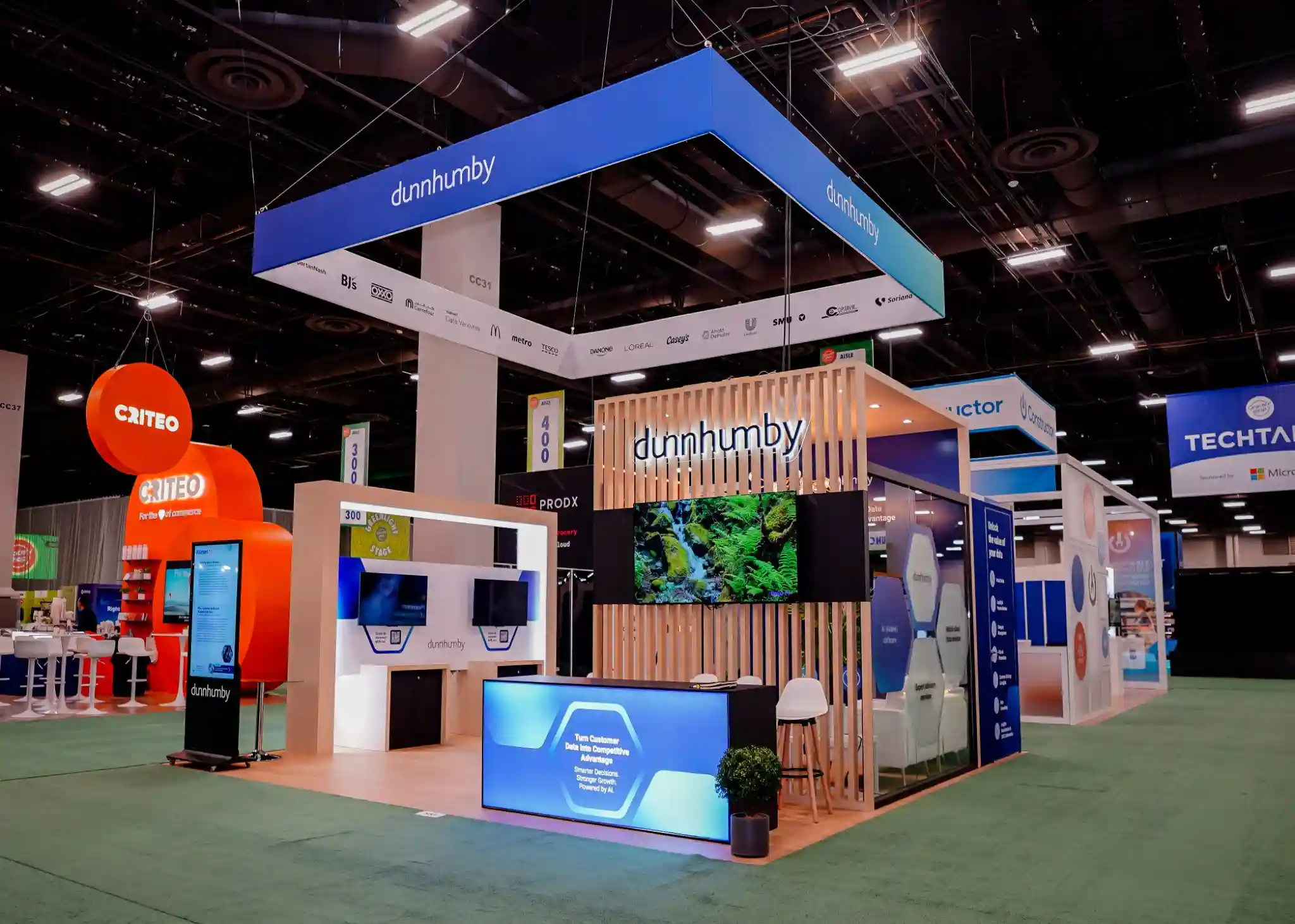
These are projects from the Pure Exhibits national portfolio, shown as examples of layouts, sightlines, and meeting zones—not as claims that every project appeared at Shoptalk. Click any image for a closer view.
Dunnhumby Analytics Center

Afresh Product Story
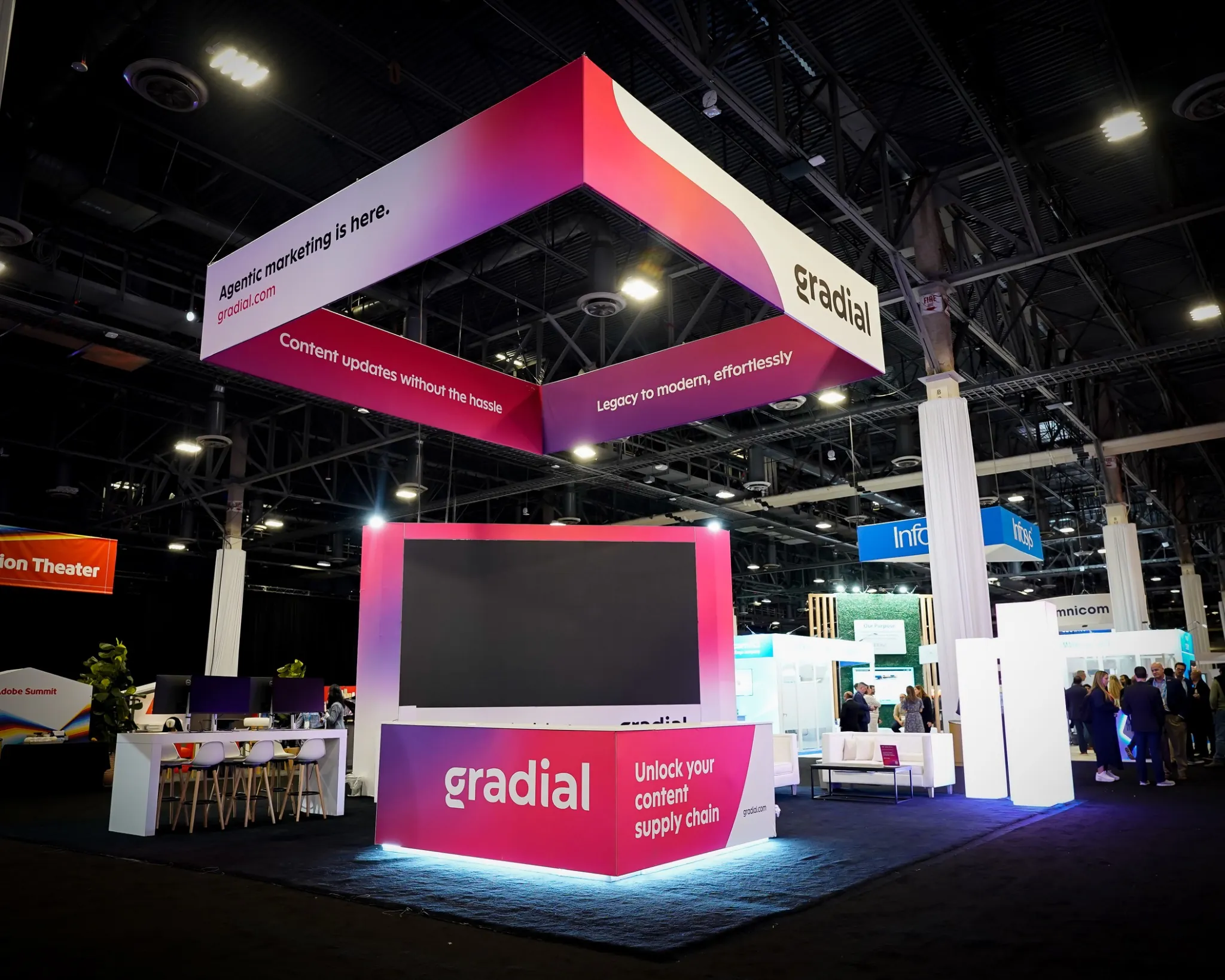
Gradial Brand Experience

Zoho Platform Display

Yuna Innovation Hub
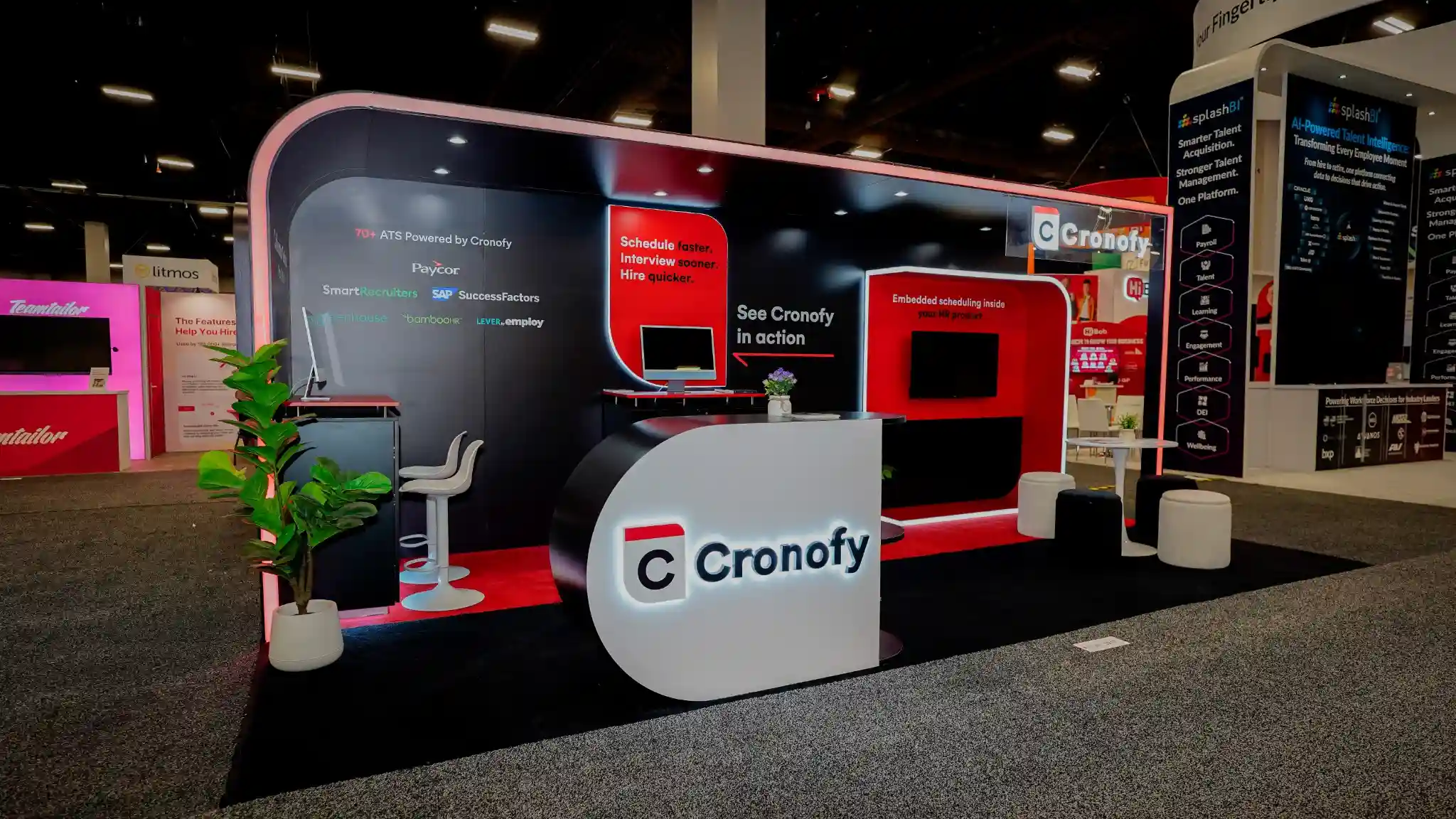
Cronofy SaaS Platform
A booth team should run like a small revenue floor
Put the roles on the shift plan. Seniority alone does not determine who should greet, qualify, demo, or own a next step.
| Role | Primary job | The handoff | Do not let them |
|---|---|---|---|
| Host / qualifier | Recognize scheduled visitors, open walk-up conversations, capture context | Routes the visitor to the right demo or account owner | Get trapped in a 20-minute product tour |
| Account owner | Carry context from pre-show outreach and Meetup | Frames the business problem for the specialist | Make the prospect repeat discovery |
| Demo specialist | Deliver the shortest credible proof for the visitor’s use case | Confirms technical next step and stakeholder needs | Default to the full product tour |
| Executive sponsor | Advance strategic accounts and peer-level relationships | Creates access, urgency, or alignment | Stand at the edge checking email |
| Floater / operations | Manage queues, devices, supplies, breaks, and lead-data quality | Keeps every other role productive | Become an unplanned sixth salesperson |
- Run the two-minute and seven-minute demos on the exact booth hardware
- Review Tier 1 accounts and the desired action for each
- Test badge capture, routing, and calendar links
- Assign every scheduled meeting to a named owner and backup
- Review arrivals due in the next 90 minutes
- Transfer hot-account context verbally, not only in CRM notes
- Check device charge, demo state, supplies, and storage
- Escalate any promised follow-up that still lacks an owner
Design for the operational rules before production
Shoptalk’s published exhibitor resources make several planning points clear. The 2027 manual and portal always control, so confirm the live deadlines and package inclusions before ordering.
Finish every exposed surface
Published display rules require finished walls and structures; pipe-and-drape cannot substitute for a booth backwall or sidewall. Design the rear and neighbor-facing surfaces into the build from day one.
Put storage in the floor plan
Shoptalk explicitly tells exhibitors to account for giveaway and operating storage. Hidden lockable storage protects both the appearance and the working rhythm of the booth.
Engineer the live demo
Published guidance notes that electrical is not automatically included in some packages and recommends dedicated internet for product demos rather than attendee Wi-Fi. Map every device and connection before ordering.
Route F&B through Mandalay Bay
Outside food and beverage is not allowed under the published booth guidance. If hospitality is part of the strategy, budget and order it through the authorized venue channel.
Plan PPE and crew access
Published move-in and move-out resources require appropriate PPE, and crew badges have limited use. Register exhibit staff separately and brief contractors before arrival.
Use one services ledger
Track design approval, COI, graphics, electrical, internet, paid lead retrieval, freight, badges, and discount deadlines in one owner-and-date sheet. Never rely on calendar memory.
Count backward from March 22, 2027
The dates below are a working strategy schedule, not official Shoptalk service deadlines. Replace each gate with the live deadline when the 2027 exhibitor manual is released.
Commercial brief
Set the revenue objective, ICP, target-account tiers, sponsorship choice, footprint, and internal owner. Decide what success means before discussing finishes.
Experience architecture
Lock conversation capacity, visitor flow, demo zones, meeting privacy, storage, and message hierarchy. Begin the account-level outreach plan.
Design approval and production
Approve the 3D direction, technical plan, graphics map, AV list, power map, and lead-capture requirements. Avoid reopening structural decisions after this point.
Meeting activation
Complete the Meetup profile and preferences on the live organizer schedule, begin Tier 1 invitations, assign account owners, and prepare personalized booth reasons.
Show services and data flow
Submit electrical, internet, lead retrieval, COI, badges, freight, and other portal orders by their current discount deadlines. Test the CRM fields and routing rules.
Full prebuild and rehearsal
Stand up the real booth, test every screen and light, approve photographs, rehearse demos on final hardware, and run a peak-arrival simulation.
Daily account stand-up
Review scheduled arrivals, confirm roles, audit data quality, and resolve follow-up ownership before the team leaves each day.
Contextual follow-up
Send the recap and promised asset, confirm the calendar action, and multi-thread Tier 1 accounts. Do not wait for the full list to be cleaned.
Measure commercial movement, not badge volume
Target coverage
Tier 1 accounts with an accepted meeting, confirmed booth visit, or active owner conversation.
Qualified conversations
Meetings that match the ICP and reveal a problem, role, timing, or project worth advancing.
Next steps booked
Qualified conversations that leave the booth with a named action, owner, and calendar date.
Opportunity acceptance
Event-sourced or influenced opportunities accepted by sales with an amount and next stage.
Meeting show rate
Accepted appointments that actually occur, separated by Hosted, general Meetup, and direct bookings.
Follow-up SLA
Hours from conversation to personal recap for Tier 1 and A-priority accounts.
Cost per next step
Total program spend divided by qualified, accepted next meetings—not raw scans.
Buying-group depth
Target accounts where the team engaged multiple relevant stakeholders instead of one contact.
Where Shoptalk programs quietly fail
The booth says everything
Category soup makes senior buyers work to understand relevance. One buyer problem and one outcome earn the conversation; the demo can hold the depth.
Meetup lives in a silo
The meetings team and booth team run different calendars, so visitors repeat themselves. Use one account brief and one owner across both environments.
The demo is a feature tour
A generic 20-minute walkthrough destroys capacity. Build a two-minute hook, a seven-minute proof, and a deeper follow-up version.
Scans become the report
A large list hides weak qualification. Report account coverage, next steps, opportunity acceptance, and pipeline—with total scans only as context.
“The prospect of managing all of the details with big trade shows is daunting to say the least. But the Pure Exhibits team made it easy… If you are looking for a real partner that you can count on, then I recommend you talk with Utsav and his team.”
Shoptalk exhibitor strategy FAQs
Strategy & ROI
What is the best strategy for exhibiting at Shoptalk?
Use a meeting-first account strategy. Define a narrow ICP and a specific buyer problem, build the target-account calendar before the event, use Meetup for short qualification and context, and make the booth the place for the tailored demo or stakeholder conversation. Measure qualified next steps and pipeline rather than total scans.
How should we set a realistic Shoptalk lead target?
Work backward from your revenue or pipeline goal using average deal value, win rate, and meeting-to-opportunity conversion. Then compare the resulting qualified-meeting target with your scheduled meetings, booth conversation capacity, and staff hours. The calculator on this page provides a starting point.
Which KPIs should an exhibitor report?
Report target-account coverage, accepted and completed meetings, ICP-qualified conversations, next steps booked onsite, opportunity acceptance, buying-group depth, follow-up response time, cost per qualified next step, and sourced or influenced pipeline. Keep scans as an activity metric, not the headline result.
Booth Design & Staffing
What booth size works best at Shoptalk?
Choose by peak conversation load. A 10×10 can support one active demo and one standing conversation; a 10×20 can handle two active zones; a 20×20 can support three to four; and a 20×30 adds space for a private or semi-private meeting. The right answer depends on scheduled meetings, team size, demo length, and desired privacy.
How should our Shoptalk booth message be written?
At 30 feet, state one outcome for one buyer. At 10 feet, show a quantified proof point, recognizable customer evidence, and a few use cases. At three feet, make the relevant demo immediately available. Avoid listing every capability on the backwall.
How many booth staff do we need?
Staff every active demo or meeting zone, add a host or qualifier, and include a floater for peak arrivals, breaks, devices, and lead-data quality. Add named account owners and executive sponsors for priority meetings. Use shifts so the floor never depends on every person being present at once.
Meetup & Follow-Up
How should sponsors use Shoptalk Meetup?
Treat each short meeting as a qualification and routing moment, not a full demo. Review the account beforehand, validate the priority problem, and reserve the final minutes to agree on a booth visit or post-show action. Sponsors considering Hosted Meetings should model the purchased volume against account fit, staff capacity, and expected conversion.
What is the difference between Hosted and general Meetup meetings?
Shoptalk states that any registered attendee can schedule general meetings through Meetup. Hosted Meetings are purchased by sponsoring organizations and are generally used for lead generation with qualified retail and consumer-brand participants. The official program rules and availability should be confirmed directly with Shoptalk.
How quickly should we follow up after Shoptalk?
Send personal recaps to priority accounts within 24 hours, including the promised asset and confirmed next step. Do not hold high-value conversations until every scan is cleaned. Lower-priority leads can enter a segmented follow-up after their qualification data is reviewed.
Mandalay Bay Logistics
What operational rules should affect the booth design?
Current published resources require finished exposed surfaces and tell exhibitors to include storage in the design. Some booth packages do not automatically include power, outside food and beverage is not allowed under published guidance, and PPE is required during move-in and move-out. Always use the final 2027 exhibitor manual and portal as the controlling source.
When should we begin planning a Shoptalk booth?
Start 16 to 24 weeks out for a custom island or a program with a large target-account motion. Smaller inlines can move faster, but the commercial brief, Meetup preparation, services orders, graphics, prebuild, and rehearsal still need protected time. If the timeline is compressed, ask what is buildable before reducing quality-control steps.
Does Pure Exhibits handle Shoptalk booth logistics?
Yes. Pure Exhibits can design and fabricate the exhibit, prebuild it for photo approval, coordinate graphics, freight, installation and dismantle, and manage required booth paperwork and service planning. Venue- or show-billed items remain subject to the organizer’s current rules and rates.
Bring the show, the space, and the target. We’ll build the system.
Send us your footprint, sponsorship package, target accounts, and demo requirements. We’ll turn them into a practical booth direction, conversation-capacity plan, and one fixed project number.
Pure Exhibits is an independent exhibit design and rental company and is not affiliated with Shoptalk. Event dates, attendance figures, programs, rules, and deadlines can change; confirm current details with Shoptalk before making commitments.